Product Updates

Engine
Surface
AI Workflows
Area
Release Status

Showing 31 - 40 of 41 updates

Improved secrets management in Snyk API & Web

General availability

We are enhancing how secrets and sensitive data are managed in Snyk API & Web. Effective today, you can designate specific fields as sensitive within your target settings, ensuring their values are automatically masked. Furthermore, Account Owners now have a new level of control with the ability to make sensitive information permanently non-retrievable after it is saved.

This enhancement is designed to significantly reduce the risk of accidental information disclosure and prevent unauthorized access to your sensitive data. By giving you granular control to define and mask specific fields, we are moving beyond a reliance on simplistic patterns and heuristics. The option to make secrets non-retrievable adds a critical layer of security, ensuring that once a secret is stored, it cannot be exposed again through the application.

This update introduces two key changes:

  • For Account Owners: A new module is available on the Settings > Authentication page. This allows Account Owners to enforce that all designated sensitive information becomes non-retrievable for everyone in the account once saved.

  • For all users: When configuring a target, you will now see a 'Mark as sensitive' checkbox for relevant fields. Selecting this option will automatically mask the field's value after it is saved. This applies to configurations such as:

    • API authentication payload

    • Login form

    • Login sequence

    • Basic authentication credentials

    • Custom headers and authentication headers

    • Custom cookies and authentication cookies

    • API Parameter Custom Values

    • Postman Environment Values

To learn more, visit How to manage secrets and sensitive data in Snyk API & Web in our user documentation.

Headshot of Ana Pascoal

Ana Pascoal | Product Manager

Tags:

Find what matters by filtering out what doesn't

New

We’ve introduced a new is not filter option for Snyk reports, which lets you exclude unwanted items directly within the platform. This feature is now available across a wide range of filters, including groups, organizations, Common Vulnerabilities and Exposures (CVEs), package names, collections, tags, asset names, and owners.

Previously, you had to export Snyk report data and manually filter out unwanted items, which was time-consuming and inefficient. We've improved this by allowing you to exclude items within Snyk, giving you a focused view, and eliminating the need for manual data manipulation outside the platform.

You can now get to the insights you need faster and more efficiently. For example, you can exclude known, low-priority issues to focus on high-severity vulnerabilities, quickly find unassigned assets by filtering for is not, or exclude environments to only see issues related to production. To use the new feature, simply select the desired filter and choose the is not option before entering the value you wish to filter out.

To learn more, visit our user documentation.

Headshot of Sara Meadzinger

Sara Meadzinger | Staff Product Manager

Tags:

Featured Zero-Day Report adds tracking for Shai-Hulud npm Supply Chain Attack - Sep 2025

Improved

We’ve expanded the Featured Zero-Day Report to include the Shai-Hulud npm supply chain attack, one of the largest compromises in the npm ecosystem to date.

This update enables Enterprise users to:

  • Identify exposure to compromised npm packages such as ngx-bootstrap and @ctrl/tinycolor.

  • Prioritize remediation and monitor progress directly in the Featured Zero-Day Report.

  • Improve visibility and accountability in zero-day response.

This addition strengthens visibility into high-impact zero-day events within Snyk Reports. By integrating the Shai-Hulud supply chain incident, customers can rapidly assess exposure, track remediation, and improve governance during ongoing threat response.

No manual action is required - data updates automatically as new advisories are published. However, running a new scan is recommended to ensure the latest results are reflected.

To learn more, visit the Featured Zero-Day Report documentation or read our blog post, Zero-day extensive NPM package compromise Shai Hulud Supply Chain Attack.

Headshot of Noa Yaffe-Ermoza

Noa Yaffe-Ermoza | Product Manager

Welcome to your new product update experience!

Improved

We heard your feedback that it can be hard to keep up with all the changes, so we've introduced new ways to help you find the information that's most relevant to you.

You now see a Subscribe to RSS feed link if you prefer to be notified about every new product update as they are announced. On the left, you can filter product updates using tags like Open Source CLI or MCP to find exactly what you're looking for. We are looking to provide an email subscription service in the new year too.

We know how important it is for you to be aware of new features and changes that impact your work. Our goal is to give you more control and a better way to get the right information at the right time. We also want to ensure our communications are consistent with our Snyk brand for you to enjoy.

The product updates link in the Snyk user interface now takes you directly to this website The red notification dot on the bell icon, in the user interface, will be paused for approximately one week from today, before returning to its usual function of alerting you to new updates. We plan to introduce a search feature for this website in a later phase and we're assessing how best to surface product updates directly in our platform.

Headshot of Simon McEvoy

Simon McEvoy | UX Content

Tags:

Enhancing the Export API with Test Usage Data!

New

We know that AppSec teams need to track and report on how Snyk is being used throughout your development lifecycle. Understanding where and how often Snyk tests are run helps you promote early testing, prevent more vulnerabilities, and see the value you're getting from Snyk. We're excited to announce the availability of the Test Usage Data in the Export API!

What's New?

Currently, detailed pre-deployment CLI test data is only available through Snowflake data share or limited CSV exports. The new dataset will provide a more direct and flexible way to access this critical information.

The Test Usage Dataset will give you programmatic access to comprehensive data on your Snyk test activities, including details like:

  • When and where tests are run: See timestamps and the environment (e.g., IDE, CLI, CI/CD).

  • Test outcomes: Understand interaction statuses and exit codes.

  • User and organization details: Identify which users and organizations are performing tests.

  • Product usage: See which Snyk products (Open Source, Container, IaC, Code) are being used for tests.

How Does It Help You?

This new Test Usage Dataset unlocks crucial data that was previously harder to access, allowing you to:

  • Boost Pre-Deployment Testing: By easily monitoring CLI test adoption, you can identify opportunities to encourage developers to test earlier and more often, leading to better vulnerability prevention.

  • Measure Snyk's ROI: Gain clearer insights into how Snyk is being utilized across your teams, helping you demonstrate the value and justify your security investments.

  • Integrate Data Easily: Pull test usage data directly into your internal dashboards, reporting tools, or custom analytics solutions without manual exports or Snowflake integration.

Headshot of Prisca Aeby

Prisca Aeby | Senior Engineering Manager

Tags:

Inventory Empty State Clarification - Snyk Essentials

Improved

We are excited to announce the UI enhancement to have a clearer empty state in Inventory! This provides clarification to why the enrichments might be empty. Main highlights include:

  • Ensure that no cell is empty without a reason; this change removes all guesswork.

  • To provide clarity on why the fields are missing, the Inventory page will display a defined empty state, including informative tooltips to guide users.

This update is scheduled to be rolled out across all Snyk environments on September 3rd. No actions are needed to enable these changes.

Headshot of Noa Moshe

Noa Moshe | Product Manager

Tags:

Now Generally Available: The 'Snyk Generated Pull Request' Report

New

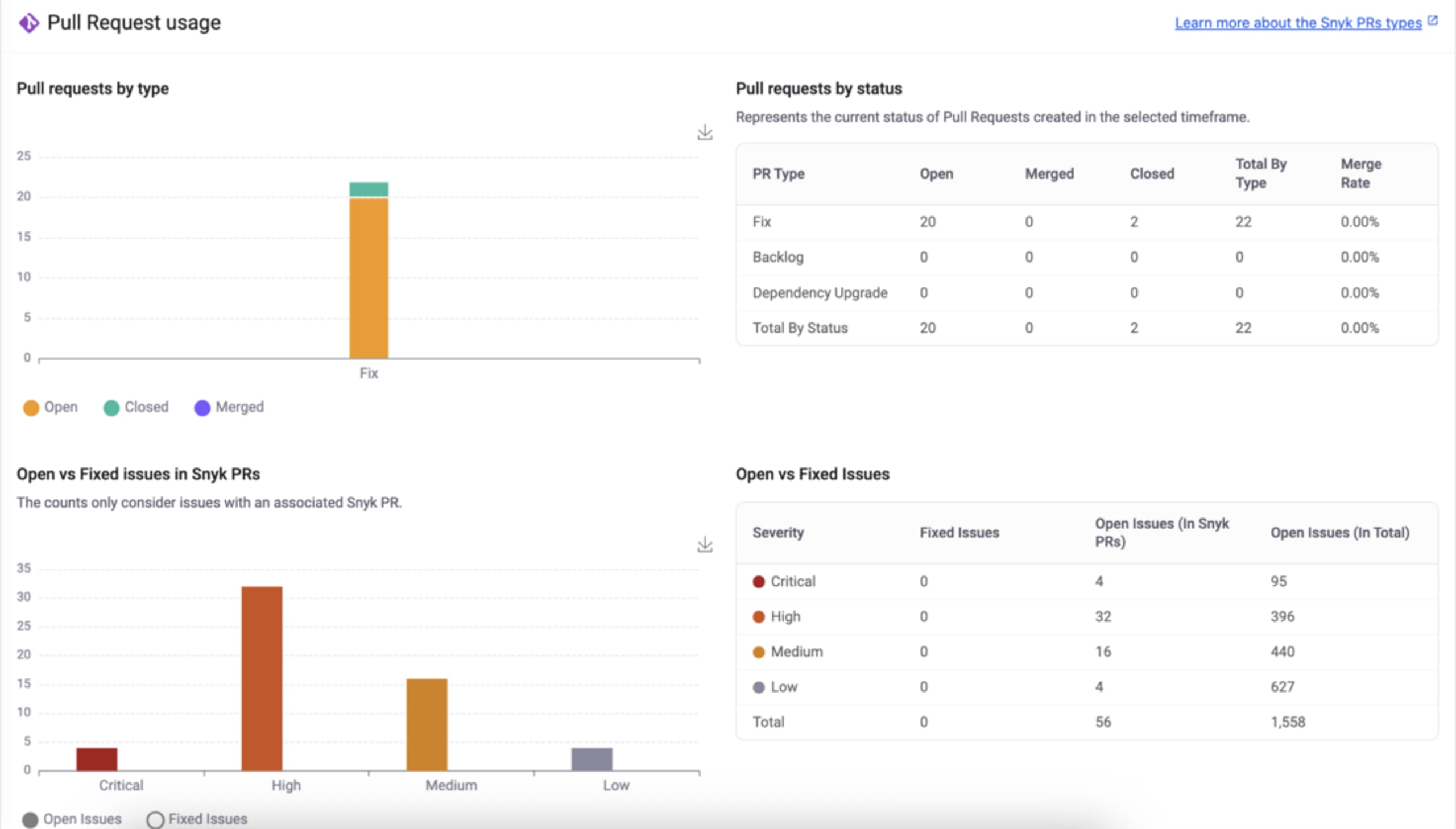
We're excited to announce the general availability of Snyk's latest report, "Snyk Generated Pull Requests."

Originally launched to early access late last year for Enterprise plans, this report sought to provide high-level visibility over your Snyk-generated manual and auto-fix PRs. The premise was simple: many Snyk accounts have hundreds, if not thousands, of projects within a single Group, which makes monitoring PRs near impossible.

Until now, AppSec teams have been left to their own devices to understand concepts such as PR volume, state, merge rates, and even mean time to merge. With the introduction of the 'Snyk Generated Pull Request' report, we make it simple to view this information and take action on it. Moreover, the report is available at both the organizational and group levels, allowing you to spend more time analyzing and less time filtering for the right granularity.

What's new in the general availability release:

  • A new global filter for specific package managers (thanks for your feedback!)

  • A new table in the drawer to track PRs created for a specific repo

  • Performance enhancements in filtering, data population, and overall loading time

To view the report, select Reports in the left-hand navigation of Snyk's UI. At the top of the page, under the Change Report dropdown, select Snyk Generated Pull Request.

Happy Remediating!

Headshot of  Ryan McMorrow

Ryan McMorrow | Product Lead, Remediation

Tags:

Exciting Update: Introducing the New Snyk Tenant-Level Analytics Experience!

Early access

We've rolled out an enhanced tenant-level Snyk Analytics experience! This update empowers you with more control and deeper insights into your security posture, making it easier than ever to manage risk across your organization.

What's New & Improved?

  • Customizable Dashboards: You can now build your own analytics dashboards using a new set of widgets. This lets you focus on the metrics that matter most to you.

  • Centralized Reporting Catalog: Access a new catalog of Snyk tenant-level reports. This central hub makes it simpler to find and access the reports you need, providing a unified view of your security data.

  • Improved Data Access: Users with group reporting permissions now have direct access to tenant-level analytics for all the groups they are authorized to view, streamlining data visibility and collaboration.

Who Can Access This Early Access?

This exciting Early Access is currently available for our Enterprise plan customers who have group-level reporting permissions.

How to Opt-In:

Look for a banner link on your existing Tenant Analytics page to opt in. You can switch back to the current General Availability (GA) experience at any time.

Also, Now Generally Available!

As part of this release, we're also pleased to announce that the Repositories Tested in CI/CD report and the PCI-DSS v4.0.1 report have been moved to General Availability.

Go to Redesigned Analytics to learn more about this new Analytics page!

Headshot of  Maor Kuriel

Maor Kuriel | Director of Product

Tags:

Snyk Essentials: An asset policy template for email notifications on newly discovered repositories

New

We've added a new asset policy template to easily keep up with new repositories discovered across all SCMs used within a specific Snyk Group.

The out-of-the-box logic is set notify on newly discovered repositories from the past 7 days that are not yet tested with Snyk. Customers only need to add the list of email recipients to save and start using it.

Snyk Essentials: An asset policy template for email notifications on newly discovered repositories

The template can be tweaked and adjusted as needed.

Headshot of Maya Mandel

Maya Mandel | Senior Manager, Product

PR Issue Summary Comment & SAST High-Context Inline Comments for GitLab & Azure Repos

Early access

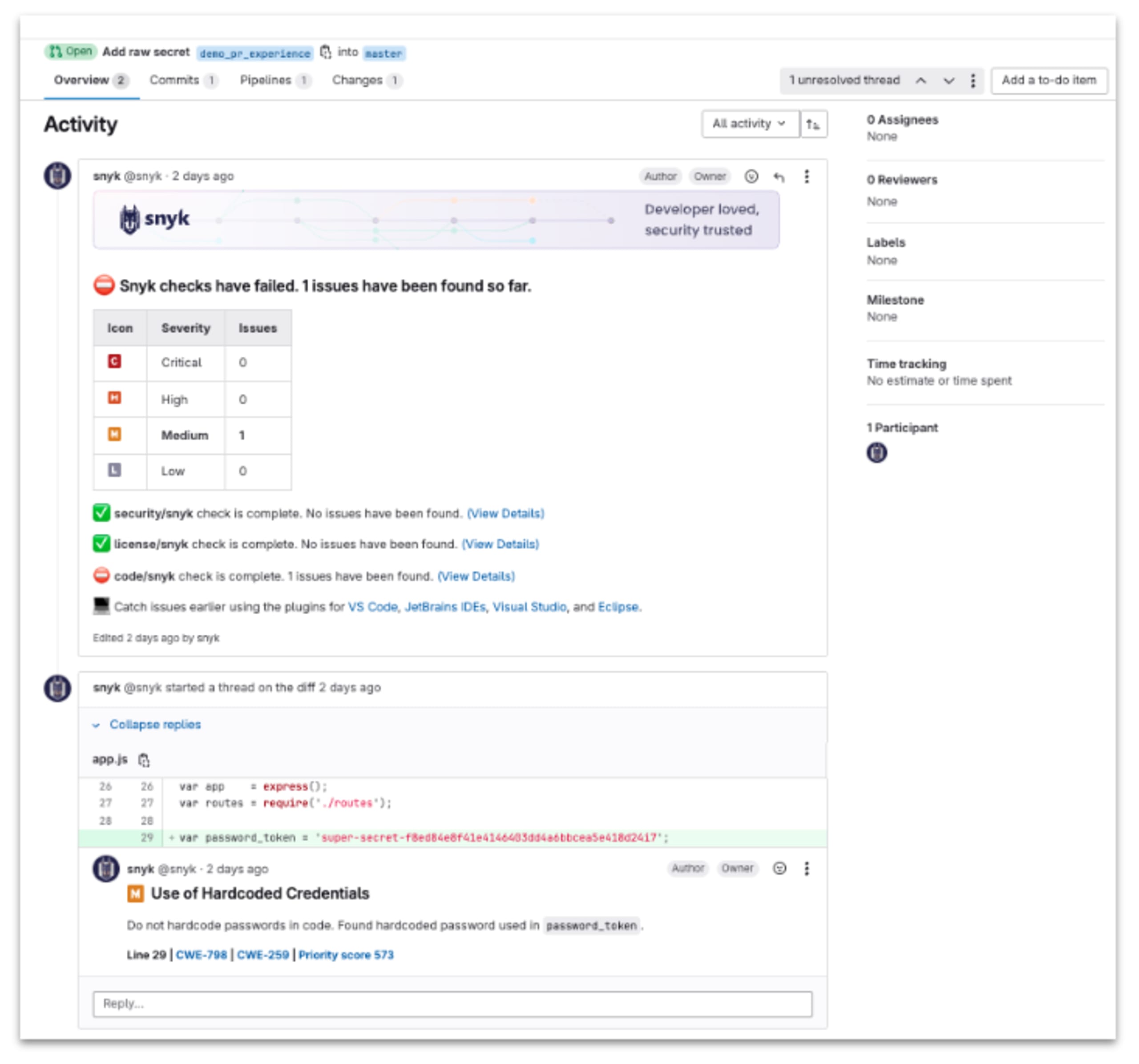
We are announcing the Early Access release of PR Issue Summary Comment and SAST High-Context Inline Comments as part of our ongoing efforts to enhance the pull request experience. These features bring critical security insights directly into your PRs, reducing context switching and streamlining vulnerability remediation.

  • PR Issue Summary Comment - With this feature, developers using Snyk PR Checks will receive a comment with a summary count of security, license, and code checks directly within their pull requests, categorized by severity (Critical, High, Medium, Low). This empowers developers to identify and address issues early, with detailed links provided for deeper investigation.

  • High-Context Inline Comments display each SAST security finding alongside key information such as CWE (Common Weakness Enumeration) and priority score and a Snyk Learn link for further guidance—helping developers remediate issues faster without leaving their SCM. 🚀

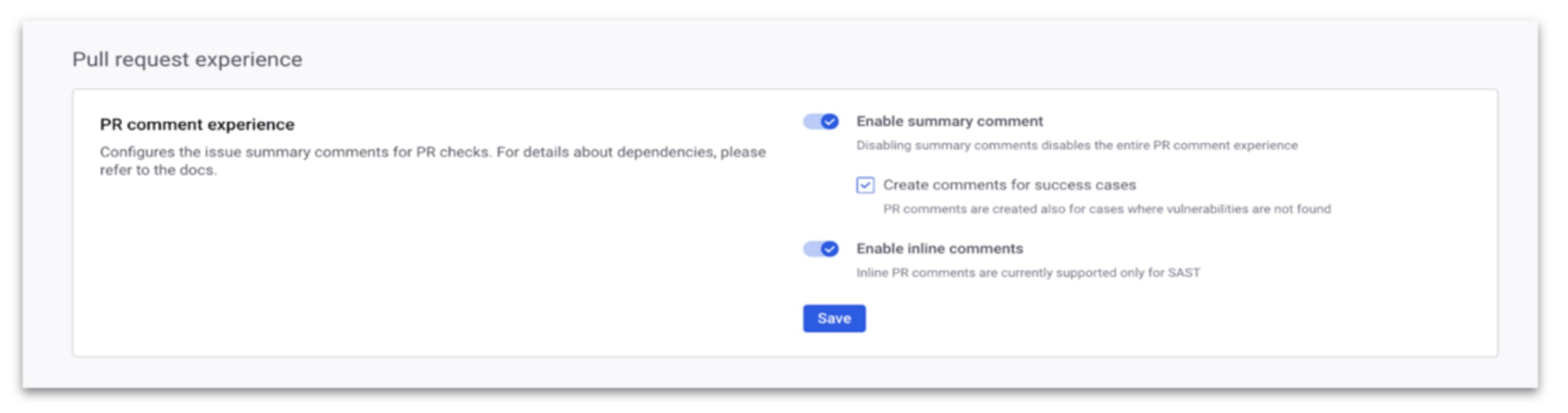
This is part of a series of enhancements designed to improve your developers’ pull request experience with Snyk, and we remain committed to further improving it. If you’re interested in enabling this feature for your organization, you can self-opt in via the Pull Request Experience section in the SCM integration settings. Check out the user docs for more details. Try it out and connect with your account team to participate in feedback sessions to shape the future of your Snyk’s workflows.

Headshot of Mayank Khera

Mayank Khera | Senior Product Manager